Patrick Puffs: A Fresh Take on 3D Sticker-Style Typography
There is a specific kind of energy that jumps off the screen when a design doesn't just sit flat but actually pops. If you have been scrolling through design trends lately, you have likely noticed the resurgence of 3D typography and the tactile, "peel-and-stick" aesthetic that is dominating everything from social media graphics to modern packaging. It is playful, it is bold, and it demands attention. This is where Patrick Puffs enters the conversation. It is not just another typeface; it is a premium font that captures that specific, textured look of a high-quality sticker or a puffy paint craft project, but rendered with the precision of professional vector graphics.
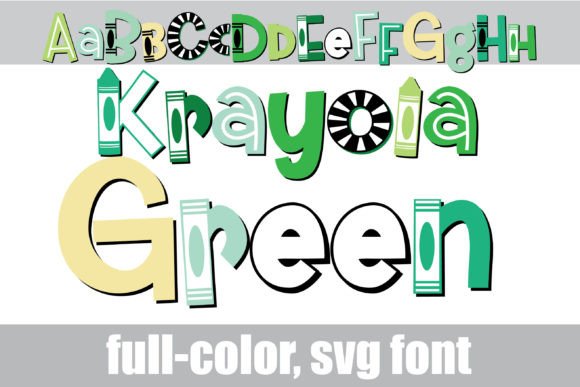
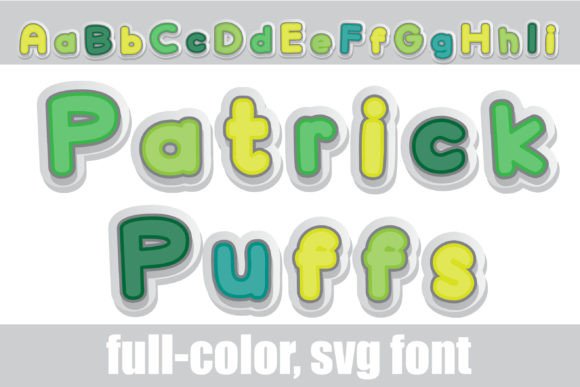
For designers, content creators, and small business owners, finding a font that bridges the gap between whimsical and professional can be a challenge. You want personality, but you also need scalability and versatility. Patrick Puffs delivers on that front by utilizing modern typography technology—specifically OpenType full-color SVG formats—to give you a vibrant, green color palette right out of the box. But it is not just about the color; it is about the depth. The font features a distinct 3D effect that makes text look like it has volume and weight, a feature that usually requires complex layering or advanced illustration skills to achieve manually.
Understanding the Tech: Why Full-Color SVG Matters
If you have tried to install a color font in the past and been met with a solid black block of text, you know the frustration of software limitations. However, the technology has matured significantly. Patrick Puffs is designed as an OpenType full-color (SVG) font. In practical terms, this means the color information and the 3D shading are embedded directly into the font file itself.
Installation is straightforward—it installs just like any standard .otf file via FontBook on a Mac or your preferred font manager on Windows. The real "magic" happens when you open a compatible program. While a font manager preview window might still show the characters in black (a common quirk of how these systems render previews), the moment you type into a program that supports SVG—such as Adobe Illustrator, Photoshop, Silhouette Studio, Quark, or Inkscape—the text appears in full, glorious color. This compatibility is expanding, but it is essential to test your workflow. If your software doesn't support color fonts, the typeface will still function, but it will render as a solid silhouette, losing the signature "puff" effect.
Creative Applications: From Branding to Merchandise
The visual weight of a 3D sticker font makes it a powerhouse for specific design assets. It is not the right choice for body copy in a novel, obviously, but for headlines, logos, and short bursts of text, it is incredibly effective.
Branding and Logo Design: If you are building a brand identity that needs to feel friendly, youthful, or tactile, Patrick Puffs offers a shortcut to that vibe. Imagine a bakery logo or a children’s apparel brand where the wordmark looks like it was crafted from soft, textured stickers. It instantly communicates a sense of fun and approachability.
Packaging Design: In a crowded marketplace, shelf appeal is everything. Using this font for callouts on packaging—like "New Flavor!" or "Limited Edition"—can draw the eye immediately. The green color palette suggests freshness or eco-friendliness, which could be perfect for organic products or sustainable goods.
Social Media and Web Graphics: On platforms like Instagram or TikTok, where content is consumed rapidly, you have milliseconds to grab attention. A bold, 3D display font breaks the scroll pattern. It works beautifully for Instagram Stories, YouTube thumbnails, or website banners where you need high impact without cluttering the design with extra images.
Digital Products and Invitations: For the hobbyist or crafter, this font is a goldmine. Creating birthday invitations, party supplies, or digital stickers for GoodNotes becomes much easier when you have a font that already looks like a sticker. It saves the hassle of adding drop shadows and gradients manually.
The Power of the Glyph Map and Alternate Characters
One of the standout features of Patrick Puffs is the inclusion of alternate colors accessible through your system or the Silhouette glyph map. This is a massive advantage for maintaining visual consistency while introducing variety.
For example, if the default green doesn't fit a specific seasonal campaign, the alternates allow you to swap out the color palette of individual letters without changing the font. This means you can create a gradient effect across a word or mix and match colors for a "confetti" look. When working in Adobe Illustrator or Silhouette Studio, accessing these glyphs is simple and opens up a world of customization. It transforms the font from a static tool into a flexible design asset that can adapt to different brand guidelines or color schemes.
Practical Advice for Font Pairing and Usability
Because Patrick Puffs is a high-impact display font, it requires careful pairing. You wouldn't pair a textured, 3D sticker font with a busy script font; it would be visual chaos. Instead, contrast is your friend here.
Pair Patrick Puffs with a clean, simple sans-serif font for your subheadings and body text. Think of fonts like Montserrat, Open Sans, or Roboto. The neutrality of the sans-serif will balance the playfulness of the puffs, ensuring your layout remains readable and professional.
Here are a few quick tips for testing your typography:
- Check the Scale: Because of the texture and 3D effect, Patrick Puffs works best at larger sizes. Don't try to use it for fine print or legal disclaimers; the details will get lost.
- Review the Glyph Map: Before finalizing a design, open the glyphs panel in your software to see all the alternate colors and characters available. You might find a specific letter style that fits your project better than the standard keys.
- Readability Check: Always print a test copy or view the design on a mobile device. What looks crisp on a desktop monitor might look muddy on a small screen if the font size is too small.
Commercial Use and Licensing Considerations
For entrepreneurs and small business owners, the utility of a font often comes down to its licensing. Patrick Puffs is positioned as a commercial font, meaning it is designed for use in projects that generate revenue. Whether you are designing t-shirts for an Etsy shop, creating marketing materials for a client, or building a brand identity, you need to ensure your license covers that usage.
Always review the specific license terms included with the download. Most premium fonts allow for a certain number of users or computers. If you are working in a team environment, make sure the license covers all your designers. Using high-quality, licensed typography not only keeps you legally compliant but also elevates the perceived value of your work. There is a distinct difference in quality between a free, generic font and a crafted, premium typeface like this one.
Ultimately, Patrick Puffs is more than just a novelty; it is a strategic design tool. It allows you to tap into the nostalgia of scrapbooking and sticker collecting while utilizing the precision of modern vector technology. Whether you are refreshing a brand identity, launching a new product line, or simply creating a standout social media graphic, this typeface provides the visual punch needed to make your message stick.