Merry Month of March: A Fresh Take on Floral Typography
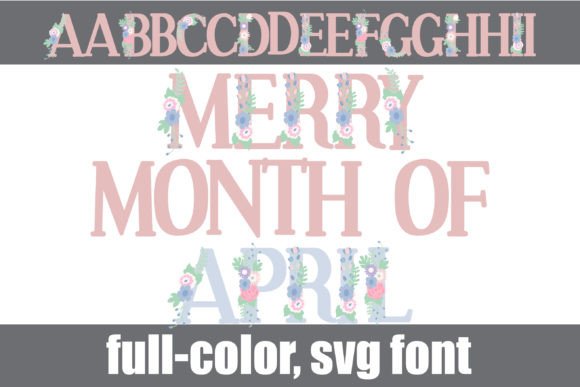
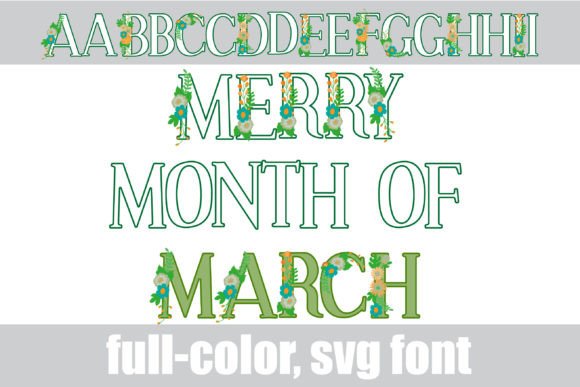
There is a specific visual energy that comes with the onset of spring. It is a feeling of renewal, blooming flora, and a distinct shift in color palettes. For designers and creative entrepreneurs, capturing this seasonal momentum is often about finding the right assets. If you are looking to infuse your current projects with a botanical flair that feels modern yet classic, the Merry Month of March typeface offers a compelling solution. It is more than just a standard serif font; it is a full-color SVG design that brings the garden directly onto the canvas, blending traditional letterforms with vibrant, organic textures.
Understanding the Visual Power of SVG Fonts
Before diving into specific applications, it is helpful to understand what makes a font like this technically unique. The Merry Month of March is constructed as a premium font utilizing OpenType SVG technology. Unlike standard vector fonts that are monochromatic, this serif font contains high-resolution bitmap data within the font file itself. This allows the letters to display complex gradients, textures, and multi-tonal colors directly in your design software.
Visually, this typeface features a green color palette that mimics the look of hand-painted botanicals. The florals are integrated into the serif structures, creating a seamless flow between text and illustration. However, a key feature for versatility is the inclusion of alternate color cases. By accessing the glyph map—whether through FontBook on a Mac, your Windows font manager, or directly within Silhouette Studio—you can swap out the default green for a variety of other hues. This ensures that the font can adapt to different brand color schemes without needing to manually alter the colors in your layout software.
Practical Applications for Modern Design
The true value of a creative font lies in its application. Because Merry Month of March is a display font, it is engineered for high-impact scenarios where you need to capture attention immediately. It is not intended for long-form body copy, but rather for headlines, sub-headers, and artistic statements.
Here is how you can leverage this typeface across various mediums:
- Brand Identity and Logo Design: For businesses in the wellness, beauty, wedding, or artisanal food industries, this font provides an instant "vibe." Using it for a wordmark logo can establish a brand identity that feels organic and established. Because it is a serif font, it carries an air of tradition, but the floral elements keep it from feeling stuffy.
- Packaging Design: Physical products need to stand out on the shelf. Whether you are designing labels for a candle line, a spring tea collection, or artisanal soaps, the botanical nature of the font adds a layer of perceived quality and care to the packaging design.
- Social Media Graphics: In the fast-scrolling environment of Instagram or Pinterest, standard sans-serifs often get lost. The full-color nature of this typeface makes it an immediate thumb-stopper for quote graphics, sale announcements, or seasonal headers.
- Invitations and Stationery: The font shines brightest in editorial design and stationery. It is perfectly suited for wedding invitations, bridal showers, or garden party flyers where a romantic, handwritten font aesthetic is desired, but with the legibility of a structured typeface.
Navigating Technical Compatibility
One of the most common hurdles with modern typography that utilizes color is software compatibility. It is important to note that not all programs can read the SVG data embedded in the font file. If you open this file in an older version of software or a program that does not support color fonts, the text will simply appear as black. This is normal behavior; the software is falling back to the basic vector outline.
To see the Merry Month of March in its full glory, you need a compatible environment. Currently, Adobe products (Photoshop, Illustrator, InDesign), Silhouette Studio, Quark, and Inkscape support full-color SVG fonts. When you type in these programs, the colors will render automatically. If you are a Silhouette user, you can also utilize the glyph map to access alternate colors, giving you control over the final look of your design assets.
Installation is straightforward. You treat the .otf file like any other font. Install it via FontBook on Mac or the Control Panel on Windows, restart your design software, and it will appear in your font list.
Strategic Typography: Pairing and Readability
While the Merry Month of March is visually striking, using it effectively requires a strategic approach to font pairing. Because this typeface is ornate and colorful, it creates a high degree of visual noise. If you pair it with another decorative or script font, your design will likely feel cluttered and illegible.
The best practice for web design and print materials is to pair this floral serif with a clean, neutral sans serif font. A typeface like Montserrat, Open Sans, or Lato provides a visual "breathing room" that allows the floral details of the header font to pop without overwhelming the reader.
Consider these pairing tips for brand recognition:
- Hierarchy is Key: Use the floral font strictly for the main headline or the brand name. Use the sans-serif for sub-headlines, dates, times, and body text.
- Color Extraction: Since the font includes green botanicals, try to match the color of your body text or background elements to one of the greens in the font. This creates visual consistency and makes the design feel cohesive.
- Scale Testing: Because of the floral details, test the font at the size you intend to use it. While it is scalable (as it is vector-based), very small sizes might make the floral details appear muddy.
Commercial Use and Licensing
For small business owners and marketers, understanding the licensing of commercial fonts is non-negotiable. When you purchase a premium font like this, you are typically paying for the license to use it in commercial projects. This means you can use it on your website, on products you sell, and in marketing materials for your business.
However, it is always best practice to review the specific End User License Agreement (EULA) provided with the download. Most standard licenses cover a specific number of users or computers. If you are using the font for a large corporation or a team of designers, ensure you have the appropriate team license. Using licensed fonts correctly protects your business and supports the independent type designers who create these intricate design assets.
Ultimately, the Merry Month of March